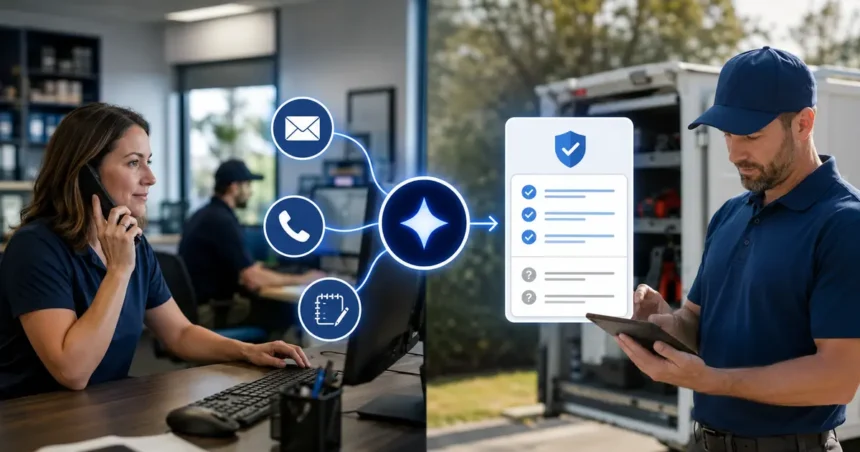
Contractors can use AI to summarize emails, calls and job notes into a consistent operating record, but the three sources should not be flattened into one generic paragraph. Each carries different evidence and risk. A strong workflow preserves the originals, separates customer reports from verified findings, identifies decisions and commitments, and produces an assigned next action.
- Quick answer
- Why multi-source summaries are difficult
- Define the operating purpose
- Use a structured schema
- Summarize emails
- Summarize calls
- Summarize job notes
- Resolve conflicts explicitly
- Create action items from explicit commitments
- Keep summaries readable for field teams
- Create role-specific views
- Standardize field-note capture first
- Build a shift-handoff procedure
- Audit source attribution
- Implementation checklist
- Choose the right technical architecture
- Protect sensitive details
- Test with answer keys
- Roll out by source
- Measure usefulness
- Frequently asked questions
- Can AI combine all customer communications?
- Should the summary replace original notes?
- Can AI write technician findings?
- How should contradictions be handled?
- What is the best first workflow?
- How long should a unified summary be?
- Related Oivic guides
- Authoritative resources
- Preserve the evidence behind the brief
Quick answer
Create one structured summary schema for identity, property, request, observations, confirmed facts, decisions, commitments, open questions and next action. Label the source of every important statement, link to the original email, call or field note, require review for high-risk records, and test whether the result helps office and field staff act without losing context.
Why multi-source summaries are difficult
An email may contain a written customer request. A call transcript may misrecognize words. A technician note may reflect a qualified inspection. Their statements do not have equal authority. If AI merges them carelessly, “customer thinks the motor failed” can become “motor failure confirmed.”
Keep source, author and time for each record. The summary should show when information conflicts or changed.
Define the operating purpose
Choose a decision: prepare a technician, brief a manager, hand work between shifts, follow up an estimate or close a job. The reader and action determine which details matter.
A universal summary may become too long for dispatch and too shallow for a warranty review. Use a shared core with role-specific views.
Use a structured schema
- Customer and verified contact
- Property and access
- Reason for contact
- Customer-reported observations
- Technician-confirmed findings
- Work completed or proposed
- Decisions and approvals
- Prices, dates and commitments
- Safety or complaint flags
- Open questions
- Next action, owner and deadline
Summarize emails
Remove quoted repetition and signatures while preserving the newest request, changed decisions, attachments and exact dates. Identify who wrote each important statement. Treat forwarded content cautiously.
Do not assume an attachment was reviewed merely because it was present. Record “photo attached” or “signed proposal attached” only when the system verified the file type and association.
Summarize calls
Use the transcript and audio according to policy. Flag low-confidence names, addresses, model numbers, prices and dates for confirmation. Preserve the difference between what the caller reported and what the agent promised.
Capture appointment status precisely: confirmed, requested or discussed. Many customer disputes begin with ambiguous summaries.
Summarize job notes
Technicians should enter observations, tests, findings, work performed, materials, recommendations and customer decisions in a consistent form. AI can organize rough notes, but the technician should verify technical conclusions and completed work.
Do not let AI add a test result, part or measurement absent from the note. A polished service report must remain true.
Resolve conflicts explicitly
When sources disagree, show both and create a verification task. Examples include two service addresses, changed appointment dates, a customer stating no fee was discussed while a call note records one, or a field note that updates the initial diagnosis.
Use the most authoritative approved source only when the business has a rule for doing so. Keep history rather than silently overwriting it.
Create action items from explicit commitments
| Source statement | Structured action |
|---|---|
| “Please call after 3 p.m. Thursday.” | Assigned callback with exact local date and time |
| “We need the photo before ordering.” | Request photo; owner and due date |
| “Technician recommends manager review.” | Service manager task linked to job notes |
| “Customer approved option B.” | Approval record requiring source verification |
| “Part will arrive next week.” | Do not create exact date unless confirmed |
Keep summaries readable for field teams
Use labels and bullets. Put safety, access, appointment and customer expectation near the top. Avoid long generated narratives that technicians must scan in a driveway.
Offer a short operational brief and a link to full history. Mobile display and offline access may matter.
Create role-specific views
A dispatcher view should emphasize address, appointment, access, reported symptoms and constraints. A technician view should add relevant history, verified findings and customer expectations. A manager reviewing a complaint needs commitments, previous contacts, completed work and unresolved issues.
Generate these views from the same governed record. Do not create separate summaries that drift apart. Show the last update and source links.
Standardize field-note capture first
AI cannot reliably organize notes that omit basic facts. Create a mobile-friendly technician form with service performed, observations, tests, parts, photos, customer communication, recommended next step and required follow-up. Allow dictation, but make the technician confirm critical fields.
Use controlled terms for repeatable data and free text for nuance. Do not force every job into a rigid checklist that hides unusual conditions.
Build a shift-handoff procedure
At the end of a shift, generate a list of open jobs and customer commitments. The outgoing coordinator reviews high-risk items, then the incoming owner acknowledges them. The system records ownership rather than assuming that a summary equals a handoff.
Include awaiting parts, unconfirmed appointments, promised callbacks, safety or complaint flags and tasks due before the next regular review.
Audit source attribution
Sample statements such as diagnosis, customer approval, quoted fee, arrival promise and work completed. Confirm that the summary labels who said it and where the evidence resides. Track unsupported statements separately from simple omissions.
Implementation checklist
- Every source retains author, channel and timestamp.
- Customer observations and technician findings are separate.
- Current decisions are distinguished from superseded ones.
- Critical names, addresses, prices and dates are verified.
- Contradictions create review tasks.
- Role-specific views use the same underlying record.
- Original evidence remains accessible according to policy.
- High-risk summaries require human confirmation.
- Tasks contain owner, deadline and context.
- Privacy, access and retention are documented.
Choose the right technical architecture
A field service platform with built-in summaries may offer simpler identity and job links. A separate assistant can be more flexible but requires permissions, integration monitoring and duplicate handling. A custom workflow provides control but creates ongoing engineering and security responsibility.
Ask where the original content, generated summary and final structured fields live. Define the system of record. Verify export, deletion, access logs and behavior when one connected system is unavailable.
Prefer a design that can fail safely: preserve the source, mark the summary as pending, avoid an unverified CRM update and alert a person.
Test identity resolution across shared email addresses, spouses, tenants, property managers and customers with several properties. An accurate summary attached to the wrong account creates a privacy and service failure. Require human review when matching confidence is low.
Document how corrected summaries propagate. The job brief, task and customer record should not retain conflicting versions after an authorized correction.
Notify the task owner when a material correction changes a commitment, appointment or safety detail. Quietly editing the summary may leave someone acting on the earlier version.
Protect sensitive details
Redact payment card numbers, credentials, access codes when no longer needed, employee medical details and unrelated personal information. Limit access by role. Review retention and deletion across call, email, CRM and AI providers.
Do not copy customer data into public AI accounts outside approved business controls. The FTC has emphasized that providers must honor privacy and confidentiality commitments, but contractors remain responsible for their own handling.
Test with answer keys
Select complete cases containing email, call and field notes. Have experienced staff create the expected summary and actions. Compare identity, dates, facts, attribution, omissions, unsupported statements and task routing.
Weight harmful errors heavily. An omitted courtesy detail is different from an invented approval or missed safety flag.
Roll out by source
- Standardize technician note fields.
- Generate draft call summaries for review.
- Add email thread summaries.
- Create a unified job brief with source labels.
- Enable selected tasks after validation.
This sequence avoids automating a pile of inconsistent notes.
Measure usefulness
- After-call and after-job documentation time
- Records with required fields
- Time to next action
- Callbacks caused by missing information
- Correction and dispute rate
- Technician replay or rereading time
- Handoff quality between office and field
Frequently asked questions
Can AI combine all customer communications?
Yes when integrations and identity matching are reliable, but source and time should remain visible. Do not merge uncertain records automatically.
Should the summary replace original notes?
No. Preserve originals according to policy so decisions and disputes can be verified.
Can AI write technician findings?
It can organize technician-provided facts. A qualified technician must confirm findings, tests and work performed.
How should contradictions be handled?
Display the conflict, identify sources and assign verification. Do not silently choose the more convenient statement.
What is the best first workflow?
Use one call type or one standardized job-note form with human review and a clear downstream reader.
How long should a unified summary be?
Use a short action brief with labeled fields and access to detail. Length should follow the decision, not a fixed word count.
Related Oivic guides
- AI Call Summaries for Contractors
- AI Email Assistants
- AI Follow-Up Systems
- Data to Keep Out of Public AI
Authoritative resources
- FTC guidance on AI privacy and confidentiality
- NIST Generative AI Profile
- CISA cybersecurity guidance for small businesses
Preserve the evidence behind the brief
Oivic helps contractors connect communication and job records into useful handoffs. Keep each fact attributable and every next action owned.